Turning robot video into training-ready data with daft-physical-ai
A Python library built on Daft for turning robot video into training-ready data, starting with hand tracking and reward scoring as UDFs, with more to come.
by YK Sugi
If you're building physical AI, daft-physical-ai gives you ready-made operations for the work that sits between raw robot recordings and a trained model. It's a new open-source Python library built on Daft:
pip install daft-physical-aiEach operation slots into any pipeline and runs lazily, batched, and distributed, with Daft handling the execution. We're starting with two use cases, hand tracking and reward scoring, with more to come.
Why
Progress in physical AI comes down to what you can do with your data. Everyone is collecting more of it, but the harder part is turning what you already have into something a model can learn from: annotating frames, scoring episodes, filtering out the runs you shouldn't train on. Today most teams build that plumbing themselves.
We wanted anyone working on physical AI to be able to skip that. Daft already reads LeRobot datasets natively, streaming them straight from Hugging Face, and we recently made it up to 15× faster. daft-physical-ai builds on top, packaging the operations that come after reading frames into UDFs you drop into your own pipeline, so your time goes to the model instead of the plumbing.
Use case 1: hand tracking
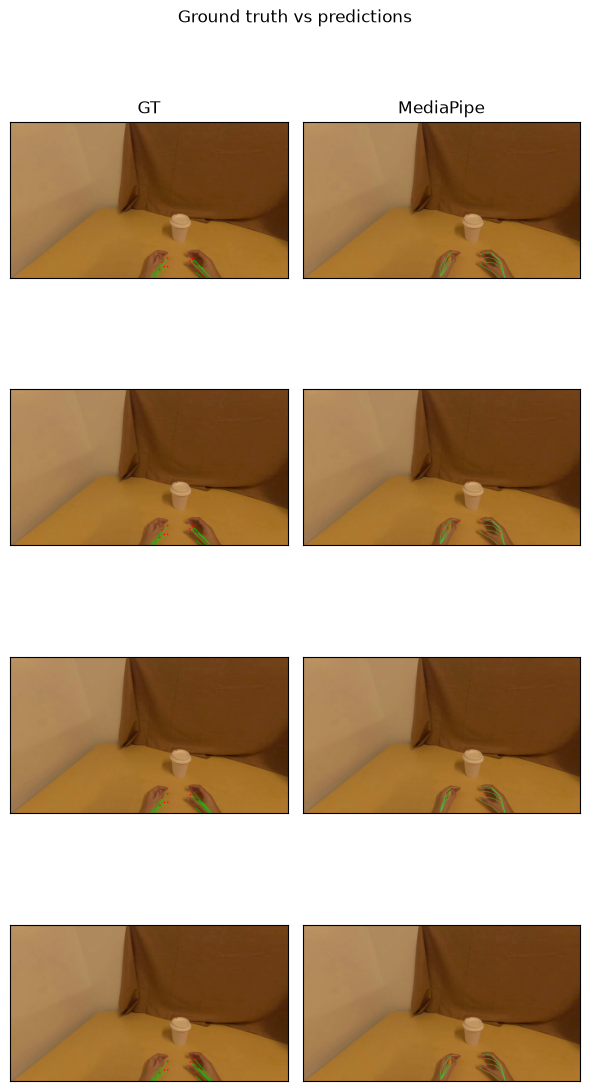
track_hands takes a Daft image column and returns a hand-pose column. Pick MediaPipe (CPU, 2D) or WiLoR (GPU, 3D MANO keypoints) - both return the same schema, so the rest of your pipeline doesn't change. Each method installs as an extra: pip install "daft-physical-ai[mediapipe]" or [wilor].
from daft.datasets import lerobot
from daft_physical_ai.hands import track_hands

# One row per frame; the camera is decoded into an image column.
df = lerobot.read("pepijn223/egodex-test", load_video_frames="observation.image")

df = df.with_column("hands", track_hands(df["observation.image"], method="mediapipe"))
df.write_parquet("annotated/")
Because it's a lazy, batched Daft UDF, nothing runs until you materialize - and frames annotate in parallel when they do. EgoDex ships ground-truth hand poses, so you can score the predictions right in the pipeline: on the sample above, MediaPipe reaches detect=100%, PCK@.1/.2/.3 = 49/84/96.
Use case 2: reward scoring
score_rewards scores robot episodes with a reward model (Robometer-4B): per-frame task progress (0-1) plus a success probability, written back as a dataset column. You bring a running Robometer eval server (local GPU or Modal) and point the pipeline at its URL.
from daft import col
from daft.datasets import lerobot
from daft_physical_ai.rewards import score_rewards

CAM = "observation.images.image"  # camera whose video the episodes index into

# One row per episode, with each episode's segment of the shared mp4.
df = lerobot.read_episodes(
    "hf://datasets/nvidia/LIBERO_LeRobot_v3/libero_90", include_video_metadata=True
).select(
    "episode_index",
    col("tasks").list_join("; ").alias("task"),
    "length",
    col(f"videos/{CAM}/from_timestamp").alias("from_ts"),
    col(f"videos/{CAM}/to_timestamp").alias("to_ts"),
    col(f"videos/{CAM}/video").alias("video"),
)

df = df.with_column(
    "rewards",
    score_rewards(
        df["task"], df["length"], df["from_ts"], df["to_ts"], df["video"],
        url=ROBOMETER_URL,  # your running Robometer eval server
    ),
)
A healthy episode climbs toward 1.0; a curve that flatlines near 0 is a failed, stalled, or mislabeled episode.
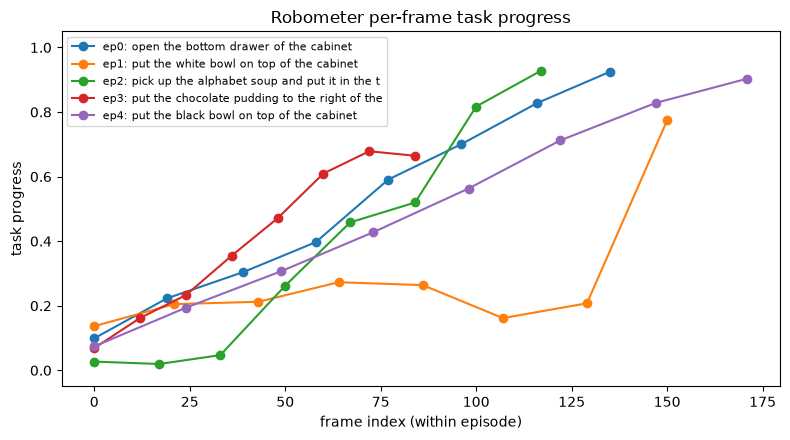
The scores are ordinary columns, so quality gates are one-liners - here, flagging episodes the model doubts succeeded before they reach BC or RL training:
from daft import col

# Episodes with final-frame success probability below 0.5 - review before training.
flagged = df.where(col("rewards")["robometer_success"][-1] < 0.5)
flagged.select("episode_index", "task").show()
Try it
The easiest way to try it is to generate a runnable demo - a notebook walking through one of the use cases above. With uvx, generating one is a single command:
uvx daft-physical-ai hands     # generate the hand tracking demo
uvx daft-physical-ai rewards   # generate the reward scoring demo
The package is on PyPI, and the source, examples, and setup details are in the daft-physical-ai repo.

